
True Metronome5.10.0 - App Store
Sie können Ergebnisse sehen in einige Sekunden.
Herausgeberbeschreibung


True Metronome — seit 2012 der Übungsbegleiter, auf den Musiker vertrauen.
Keine Werbung. Kein Abo.
Starte das Metronom mit einem Fingertipp — ziehe das Gewicht, wähle die Taktart und übe los. Jeder Schlag stammt aus Aufnahmen echter mechanischer Metronome, mit feinen natürlichen Variationen, die auch lange Übungseinheiten angenehm machen.
ÜBUNGSWERKZEUGE (Pro)
- Unterteilungen — 11 Muster inklusive Triolen, Sechzehntel und Swing
- Tempo-Trainer — steigert das Tempo schrittweise über mehrere Takte, sodass du ganz nebenbei schneller wirst
- Live-Tempoerkennung — das Mikrofon hört deinem Spiel zu und zeigt dein aktuelles BPM in Echtzeit
- Voreinstellungen — speichere und lade deine Lieblings-Setups (BPM, Taktart, Unterteilungen)
- Blitz auf Schlag — der Bildschirm blitzt bei jedem Schlag als visueller Hinweis
METRONOM
- Kein Timing-Versatz — mathematisch exakte Schläge
- Natürlicher akustischer Klang aus Aufnahmen echter Metronome
- Realistische Pendelphysik
- Taktarten von 1 bis 13 Schlägen pro Takt
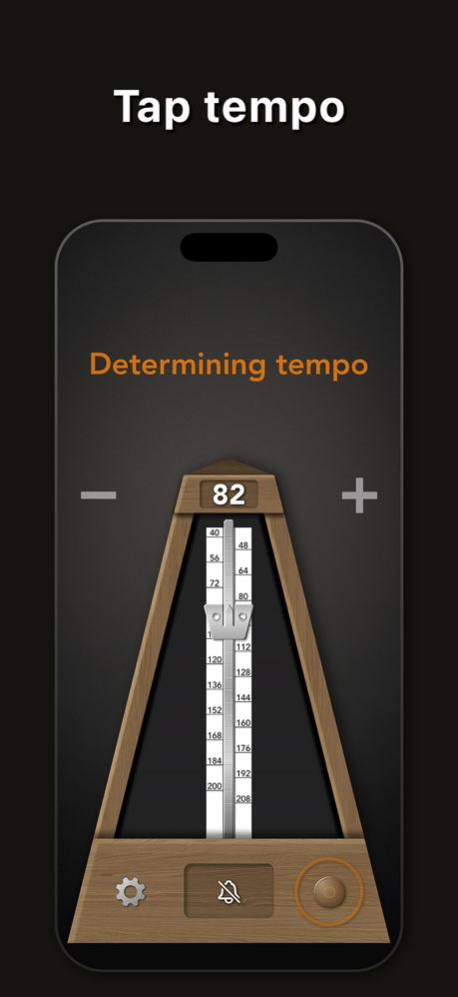
- Tap Tempo zum Anpassen an jeden Song — 5 kostenlos pro Tag, unbegrenzt mit Pro
- Schöne Hintergründe und verschiedene Designs
APPLE-ÖKOSYSTEM
- Apple Watch App — steuere das Metronom vom Handgelenk
- Siri — „Hey Siri, starte Metronom" oder „Allegro Metronom"
- Live-Aktivitäten & Dynamic Island — Tempo immer sichtbar
- Home- und Sperrbildschirm-Widgets
- Hintergrundwiedergabe
FORTSCHRITT VERFOLGEN
- Übungsstatistiken — täglich, wöchentlich und monatlich
- Weltrangliste — vergleiche dich mit Musikern in deinem Land und weltweit
KOSTENLOSE VERSION
Alle Tempi (20–400 BPM), alle Hintergründe, 2 Designs, alle Taktarten, 1 Glockenakzent und Hintergrundwiedergabe.
PRO-UPGRADE (Einmalkauf)
Unterteilungen, Tempo-Trainer, Live-Tempoerkennung, Tap Tempo, Voreinstellungen, Blitz auf Schlag, alle Designs, alle Glockenakzente, Siri, Apple Watch, Widgets und Live-Aktivitäten.
Kein Abo. Einmal kaufen, für immer nutzen.
Genutzt von klassischen Musikern, Studierenden und Lehrkräften in über 190 Ländern. Verfügbar auf iPhone, iPad, Mac und Apple Watch.
Über True Metronome
Das Unternehmen, das True Metronome entwickelt, ist Mikhail Motyzhenkov. Die neueste vom Entwickler veröffentlichte Version ist 5.10.0.
Um True Metronome auf Ihrem iOS-Gerät zu installieren, klicken Sie einfach auf die grüne Schaltfläche Weiter zur App oben, um den Installationsvorgang zu starten. Die App ist seit 2026-10-09 auf unserer Website gelistet und wurde 0 Mal heruntergeladen. Wir haben bereits geprüft, ob der Download-Link sicher ist; zu Ihrem eigenen Schutz empfehlen wir jedoch, die heruntergeladene App mit Ihrem Antivirusprogramm zu scannen. Ihr Antivirusprogramm kann True Metronome als Malware erkennen, wenn der Download-Link defekt ist.
So installieren Sie True Metronome auf Ihrem iOS-Gerät:
- Klicken Sie auf unserer Website auf die Schaltfläche Weiter zur App. Dadurch werden Sie zum App Store weitergeleitet.
- Sobald True Metronome im iTunes-Eintrag Ihres iOS-Geräts angezeigt wird, können Sie den Download und die Installation starten. Tippen Sie rechts neben der App auf die Schaltfläche LADEN, um den Download zu starten.
- Wenn Sie nicht in der iOS App Store App angemeldet sind, werden Sie nach Ihrer Apple-ID und/oder Ihrem Passwort gefragt.
- Nachdem True Metronome heruntergeladen wurde, sehen Sie rechts einen INSTALLIEREN-Button. Tippen Sie darauf, um die eigentliche Installation der iOS-App zu starten.
- Sobald die Installation abgeschlossen ist, können Sie auf die Schaltfläche ÖFFNEN tippen, um sie zu starten. Das Symbol wird außerdem zum Startbildschirm Ihres Geräts hinzugefügt.
Programmdetails
Systemanforderungen
Download-Informationen
Preisgestaltung
Versionsgeschichte
Version 5.10.0
veröffentlicht am 2026-10-09
• Ändere das Tempo bei laufendem Metronom mit den +/−-Tasten oder tippe auf die BPM-Zahl, um ein neues Tempo einzugeben.
• Halte das App-Symbol auf dem Home-Bildschirm gedrückt, um ein Problem zu melden oder eine Idee zu teilen.
Version 5.10.0
veröffentlicht am 2026-10-15
Version History • Adjust the tempo while the metronome is playing with the +/− buttons, or tap the BPM number to enter a new tempo.
• Touch and hold the app icon on your Home Screen to report a problem or share an idea. 5.10.0 5d ago Bug fixes and performance improvements. 5.9.1 Sep 27 Version 5.9.0 improves tempo detection and refreshes the interface.
• Tempo detection from sound now uses Apple’s Music Understanding framework on iOS 27, iPadOS 27, and macOS 27.
• Tap the Italian tempo marking to choose a musical tempo and set its BPM.
• Refined glass controls, panels, animations, and touch feedback.
• Clearer onboarding with animated gesture demonstrations.
• Faster startup, smoother skin changes, and stability improvements.
Thanks for using True Metronome! 5.9.0 Sep 17 Bug fixes and performance improvements. 5.8.2 Aug 1 Bug fixes and performance improvements. 5.8.1 Jul 30 More Rhythms to Practice
The subdivision picker now includes seven new patterns alongside quarter, eighth, triplet, and sixteenth: swing, dotted, double-dotted, and quintuplets through octuplets — 5 to 8 notes per beat. Each pattern has its own engraved note glyph, and on Mac the number keys 5–8 select the new tuplets instantly. Tap the note icon above the tempo to try them. 5.8.0 Jul 16 This update includes under-the-hood improvements to keep your practice sessions smooth and reliable. Thank you for using True Metronome! 5.7.2 Jul 9 This update includes under-the-hood improvements to keep your practice sessions smooth and reliable. Thank you for using True Metronome! 5.7.1 Jun 22 Instant Start
The first click now sounds the instant you press play, in sync with the pendulum — so you can lock onto a live performance instead of waiting for the first beat. Turn it on in Settings → Playback. 5.7.0 Jun 9 Bug fixes and improvements. 5.6.3 Jun 2 Bug fixes and performance improvements. 5.6.2 May 31 Bug fixes and performance improvements. 5.6.1 May 31 • Tap tempo: first 3 uses free
• We'll remind you before your trial ends
• Faster, more reliable purchases
• Bug fixes 5.6.0 May 25 Bug fixes and performance improvements. 5.5.5 May 19 Bug fixes and performance improvements. 5.5.4 May 13 Bug fixes and performance improvements. 5.5.3 May 6 Bug fixes and performance improvements. 5.5.2 May 2 Bug fixes and improvements 5.5.1 Apr 30 • Extended tempo range: 20–400 BPM
• Bug fixes and improvements 5.5 Apr 25 • Extended tempo range: 20–400 BPM
• Bug fixes and improvements 5.4 Apr 21 • Tap the BPM number to type in an exact tempo
• You can now hide the +/- buttons in Settings
• Bug fixes and improvements 5.3 Apr 13 • New: Screen flash on beat — a visual aid that flashes the screen on every beat (Pro) 5.2.2 Apr 9 • New: Screen flash on beat — a visual aid that flashes the screen on every beat (Pro) 5.2.1 Apr 8 • New: Screen flash on beat — a visual aid that flashes the screen on every beat (Pro) 5.2 Apr 7 • New: Presets — save and load your favorite metronome setups (BPM, time signature, subdivisions) 5.1.1 Apr 3
Version 5.9.1
veröffentlicht am 2026-10-08
Version History Bug fixes and performance improvements. 5.9.1 Sep 27 Version 5.9.0 improves tempo detection and refreshes the interface.
• Tempo detection from sound now uses Apple’s Music Understanding framework on iOS 27, iPadOS 27, and macOS 27.
• Tap the Italian tempo marking to choose a musical tempo and set its BPM.
• Refined glass controls, panels, animations, and touch feedback.
• Clearer onboarding with animated gesture demonstrations.
• Faster startup, smoother skin changes, and stability improvements.
Thanks for using True Metronome! 5.9.0 Sep 17 Bug fixes and performance improvements. 5.8.2 Aug 1 Bug fixes and performance improvements. 5.8.1 Jul 30 More Rhythms to Practice
The subdivision picker now includes seven new patterns alongside quarter, eighth, triplet, and sixteenth: swing, dotted, double-dotted, and quintuplets through octuplets — 5 to 8 notes per beat. Each pattern has its own engraved note glyph, and on Mac the number keys 5–8 select the new tuplets instantly. Tap the note icon above the tempo to try them. 5.8.0 Jul 16 This update includes under-the-hood improvements to keep your practice sessions smooth and reliable. Thank you for using True Metronome! 5.7.2 Jul 9 This update includes under-the-hood improvements to keep your practice sessions smooth and reliable. Thank you for using True Metronome! 5.7.1 Jun 22 Instant Start
The first click now sounds the instant you press play, in sync with the pendulum — so you can lock onto a live performance instead of waiting for the first beat. Turn it on in Settings → Playback. 5.7.0 Jun 9 Bug fixes and improvements. 5.6.3 Jun 2 Bug fixes and performance improvements. 5.6.2 May 31 Bug fixes and performance improvements. 5.6.1 May 31 • Tap tempo: first 3 uses free
• We'll remind you before your trial ends
• Faster, more reliable purchases
• Bug fixes 5.6.0 May 25 Bug fixes and performance improvements. 5.5.5 May 19 Bug fixes and performance improvements. 5.5.4 May 13 Bug fixes and performance improvements. 5.5.3 May 6 Bug fixes and performance improvements. 5.5.2 May 2 Bug fixes and improvements 5.5.1 Apr 30 • Extended tempo range: 20–400 BPM
• Bug fixes and improvements 5.5 Apr 25 • Extended tempo range: 20–400 BPM
• Bug fixes and improvements 5.4 Apr 21 • Tap the BPM number to type in an exact tempo
• You can now hide the +/- buttons in Settings
• Bug fixes and improvements 5.3 Apr 13 • New: Screen flash on beat — a visual aid that flashes the screen on every beat (Pro) 5.2.2 Apr 9 • New: Screen flash on beat — a visual aid that flashes the screen on every beat (Pro) 5.2.1 Apr 8 • New: Screen flash on beat — a visual aid that flashes the screen on every beat (Pro) 5.2 Apr 7 • New: Presets — save and load your favorite metronome setups (BPM, time signature, subdivisions) 5.1.1 Apr 3 • New: Presets — save and load your favorite metronome setups (BPM, time signature, subdivisions) 5.1 Mar 24
Version 5.9.1
veröffentlicht am 2026-10-01
Version History Bug fixes and performance improvements. 5.9.1 3d ago Version 5.9.0 improves tempo detection and refreshes the interface.
• Tempo detection from sound now uses Apple’s Music Understanding framework on iOS 27, iPadOS 27, and macOS 27.
• Tap the Italian tempo marking to choose a musical tempo and set its BPM.
• Refined glass controls, panels, animations, and touch feedback.
• Clearer onboarding with animated gesture demonstrations.
• Faster startup, smoother skin changes, and stability improvements.
Thanks for using True Metronome! 5.9.0 Sep 17 Bug fixes and performance improvements. 5.8.2 Aug 1 Bug fixes and performance improvements. 5.8.1 Jul 30 More Rhythms to Practice
The subdivision picker now includes seven new patterns alongside quarter, eighth, triplet, and sixteenth: swing, dotted, double-dotted, and quintuplets through octuplets — 5 to 8 notes per beat. Each pattern has its own engraved note glyph, and on Mac the number keys 5–8 select the new tuplets instantly. Tap the note icon above the tempo to try them. 5.8.0 Jul 16 This update includes under-the-hood improvements to keep your practice sessions smooth and reliable. Thank you for using True Metronome! 5.7.2 Jul 9 This update includes under-the-hood improvements to keep your practice sessions smooth and reliable. Thank you for using True Metronome! 5.7.1 Jun 22 Instant Start
The first click now sounds the instant you press play, in sync with the pendulum — so you can lock onto a live performance instead of waiting for the first beat. Turn it on in Settings → Playback. 5.7.0 Jun 9 Bug fixes and improvements. 5.6.3 Jun 2 Bug fixes and performance improvements. 5.6.2 May 31 Bug fixes and performance improvements. 5.6.1 May 31 • Tap tempo: first 3 uses free
• We'll remind you before your trial ends
• Faster, more reliable purchases
• Bug fixes 5.6.0 May 25 Bug fixes and performance improvements. 5.5.5 May 19 Bug fixes and performance improvements. 5.5.4 May 13 Bug fixes and performance improvements. 5.5.3 May 6 Bug fixes and performance improvements. 5.5.2 May 2 Bug fixes and improvements 5.5.1 Apr 30 • Extended tempo range: 20–400 BPM
• Bug fixes and improvements 5.5 Apr 25 • Extended tempo range: 20–400 BPM
• Bug fixes and improvements 5.4 Apr 21 • Tap the BPM number to type in an exact tempo
• You can now hide the +/- buttons in Settings
• Bug fixes and improvements 5.3 Apr 13 • New: Screen flash on beat — a visual aid that flashes the screen on every beat (Pro) 5.2.2 Apr 9 • New: Screen flash on beat — a visual aid that flashes the screen on every beat (Pro) 5.2.1 Apr 8 • New: Screen flash on beat — a visual aid that flashes the screen on every beat (Pro) 5.2 Apr 7 • New: Presets — save and load your favorite metronome setups (BPM, time signature, subdivisions) 5.1.1 Apr 3 • New: Presets — save and load your favorite metronome setups (BPM, time signature, subdivisions) 5.1 Mar 24
Version 5.9.0
veröffentlicht am 2026-09-24
Version History Version 5.9.0 improves tempo detection and refreshes the interface.
• Tempo detection from sound now uses Apple’s Music Understanding framework on iOS 27, iPadOS 27, and macOS 27.
• Tap the Italian tempo marking to choose a musical tempo and set its BPM.
• Refined glass controls, panels, animations, and touch feedback.
• Clearer onboarding with animated gesture demonstrations.
• Faster startup, smoother skin changes, and stability improvements.
Thanks for using True Metronome! 5.9.0 6d ago Bug fixes and performance improvements. 5.8.2 Aug 1 Bug fixes and performance improvements. 5.8.1 Jul 30 More Rhythms to Practice
The subdivision picker now includes seven new patterns alongside quarter, eighth, triplet, and sixteenth: swing, dotted, double-dotted, and quintuplets through octuplets — 5 to 8 notes per beat. Each pattern has its own engraved note glyph, and on Mac the number keys 5–8 select the new tuplets instantly. Tap the note icon above the tempo to try them. 5.8.0 Jul 16 This update includes under-the-hood improvements to keep your practice sessions smooth and reliable. Thank you for using True Metronome! 5.7.2 Jul 9 This update includes under-the-hood improvements to keep your practice sessions smooth and reliable. Thank you for using True Metronome! 5.7.1 Jun 22 Instant Start
The first click now sounds the instant you press play, in sync with the pendulum — so you can lock onto a live performance instead of waiting for the first beat. Turn it on in Settings → Playback. 5.7.0 Jun 9 Bug fixes and improvements. 5.6.3 Jun 2 Bug fixes and performance improvements. 5.6.2 May 31 Bug fixes and performance improvements. 5.6.1 May 31 • Tap tempo: first 3 uses free
• We'll remind you before your trial ends
• Faster, more reliable purchases
• Bug fixes 5.6.0 May 25 Bug fixes and performance improvements. 5.5.5 May 19 Bug fixes and performance improvements. 5.5.4 May 13 Bug fixes and performance improvements. 5.5.3 May 6 Bug fixes and performance improvements. 5.5.2 May 2 Bug fixes and improvements 5.5.1 Apr 30 • Extended tempo range: 20–400 BPM
• Bug fixes and improvements 5.5 Apr 25 • Extended tempo range: 20–400 BPM
• Bug fixes and improvements 5.4 Apr 21 • Tap the BPM number to type in an exact tempo
• You can now hide the +/- buttons in Settings
• Bug fixes and improvements 5.3 Apr 13 • New: Screen flash on beat — a visual aid that flashes the screen on every beat (Pro) 5.2.2 Apr 9 • New: Screen flash on beat — a visual aid that flashes the screen on every beat (Pro) 5.2.1 Apr 8 • New: Screen flash on beat — a visual aid that flashes the screen on every beat (Pro) 5.2 Apr 7 • New: Presets — save and load your favorite metronome setups (BPM, time signature, subdivisions) 5.1.1 Apr 3 • New: Presets — save and load your favorite metronome setups (BPM, time signature, subdivisions) 5.1 Mar 24 True Metronome 5 — completely rebuilt from the ground up.
Now free with no ads!
New in v5:
- Subdivisions — eighth notes, triplets, sixteenth notes
- Tempo Trainer — gradual tempo increase for building speed
- Live Tempo Detection — microphone listens and shows your BPM
- 4 beautiful backgrounds
- Refined UI with smoother animations
- Rewritten in Swift for better performance
Pro upgrade (one-time purchase) for all advanced features.
No subscription, ever. 5.0 Mar 20
Version 5.8.2
veröffentlicht am 2026-09-17
Version History Bug fixes and performance improvements. 5.8.2 Aug 1 Bug fixes and performance improvements. 5.8.1 Jul 30 More Rhythms to Practice
The subdivision picker now includes seven new patterns alongside quarter, eighth, triplet, and sixteenth: swing, dotted, double-dotted, and quintuplets through octuplets — 5 to 8 notes per beat. Each pattern has its own engraved note glyph, and on Mac the number keys 5–8 select the new tuplets instantly. Tap the note icon above the tempo to try them. 5.8.0 Jul 16 This update includes under-the-hood improvements to keep your practice sessions smooth and reliable. Thank you for using True Metronome! 5.7.2 Jul 9 This update includes under-the-hood improvements to keep your practice sessions smooth and reliable. Thank you for using True Metronome! 5.7.1 Jun 22 Instant Start
The first click now sounds the instant you press play, in sync with the pendulum — so you can lock onto a live performance instead of waiting for the first beat. Turn it on in Settings → Playback. 5.7.0 Jun 9 Bug fixes and improvements. 5.6.3 Jun 2 Bug fixes and performance improvements. 5.6.2 May 31 Bug fixes and performance improvements. 5.6.1 May 31 • Tap tempo: first 3 uses free
• We'll remind you before your trial ends
• Faster, more reliable purchases
• Bug fixes 5.6.0 May 25 Bug fixes and performance improvements. 5.5.5 May 19 Bug fixes and performance improvements. 5.5.4 May 13 Bug fixes and performance improvements. 5.5.3 May 6 Bug fixes and performance improvements. 5.5.2 May 2 Bug fixes and improvements 5.5.1 Apr 30 • Extended tempo range: 20–400 BPM
• Bug fixes and improvements 5.5 Apr 25 • Extended tempo range: 20–400 BPM
• Bug fixes and improvements 5.4 Apr 21 • Tap the BPM number to type in an exact tempo
• You can now hide the +/- buttons in Settings
• Bug fixes and improvements 5.3 Apr 13 • New: Screen flash on beat — a visual aid that flashes the screen on every beat (Pro) 5.2.2 Apr 9 • New: Screen flash on beat — a visual aid that flashes the screen on every beat (Pro) 5.2.1 Apr 8 • New: Screen flash on beat — a visual aid that flashes the screen on every beat (Pro) 5.2 Apr 7 • New: Presets — save and load your favorite metronome setups (BPM, time signature, subdivisions) 5.1.1 Apr 3 • New: Presets — save and load your favorite metronome setups (BPM, time signature, subdivisions) 5.1 Mar 24 True Metronome 5 — completely rebuilt from the ground up.
Now free with no ads!
New in v5:
- Subdivisions — eighth notes, triplets, sixteenth notes
- Tempo Trainer — gradual tempo increase for building speed
- Live Tempo Detection — microphone listens and shows your BPM
- 4 beautiful backgrounds
- Refined UI with smoother animations
- Rewritten in Swift for better performance
Pro upgrade (one-time purchase) for all advanced features.
No subscription, ever. 5.0 Mar 20 • World rankings — compare your practice time with musicians in your country and worldwide
• Improved power efficiency in background mode
• Fixed an issue with practice time calculation 4.6 Jan 1
Version 5.8.0
veröffentlicht am 2026-07-23
Version History More Rhythms to Practice
The subdivision picker now includes seven new patterns alongside quarter, eighth, triplet, and sixteenth: swing, dotted, double-dotted, and quintuplets through octuplets — 5 to 8 notes per beat. Each pattern has its own engraved note glyph, and on Mac the number keys 5–8 select the new tuplets instantly. Tap the note icon above the tempo to try them. 5.8.0 Jul 16 This update includes under-the-hood improvements to keep your practice sessions smooth and reliable. Thank you for using True Metronome! 5.7.2 Jul 9 This update includes under-the-hood improvements to keep your practice sessions smooth and reliable. Thank you for using True Metronome! 5.7.1 Jun 22 Instant Start
The first click now sounds the instant you press play, in sync with the pendulum — so you can lock onto a live performance instead of waiting for the first beat. Turn it on in Settings → Playback. 5.7.0 Jun 9 Bug fixes and improvements. 5.6.3 Jun 2 Bug fixes and performance improvements. 5.6.2 May 31 Bug fixes and performance improvements. 5.6.1 May 31 • Tap tempo: first 3 uses free
• We'll remind you before your trial ends
• Faster, more reliable purchases
• Bug fixes 5.6.0 May 25 Bug fixes and performance improvements. 5.5.5 May 19 Bug fixes and performance improvements. 5.5.4 May 13 Bug fixes and performance improvements. 5.5.3 May 6 Bug fixes and performance improvements. 5.5.2 May 2 Bug fixes and improvements 5.5.1 Apr 30 • Extended tempo range: 20–400 BPM
• Bug fixes and improvements 5.5 Apr 25 • Extended tempo range: 20–400 BPM
• Bug fixes and improvements 5.4 Apr 21 • Tap the BPM number to type in an exact tempo
• You can now hide the +/- buttons in Settings
• Bug fixes and improvements 5.3 Apr 13 • New: Screen flash on beat — a visual aid that flashes the screen on every beat (Pro) 5.2.2 Apr 9 • New: Screen flash on beat — a visual aid that flashes the screen on every beat (Pro) 5.2.1 Apr 8 • New: Screen flash on beat — a visual aid that flashes the screen on every beat (Pro) 5.2 Apr 7 • New: Presets — save and load your favorite metronome setups (BPM, time signature, subdivisions) 5.1.1 Apr 3 • New: Presets — save and load your favorite metronome setups (BPM, time signature, subdivisions) 5.1 Mar 24 True Metronome 5 — completely rebuilt from the ground up.
Now free with no ads!
New in v5:
- Subdivisions — eighth notes, triplets, sixteenth notes
- Tempo Trainer — gradual tempo increase for building speed
- Live Tempo Detection — microphone listens and shows your BPM
- 4 beautiful backgrounds
- Refined UI with smoother animations
- Rewritten in Swift for better performance
Pro upgrade (one-time purchase) for all advanced features.
No subscription, ever. 5.0 Mar 20 • World rankings — compare your practice time with musicians in your country and worldwide
• Improved power efficiency in background mode
• Fixed an issue with practice time calculation 4.6 Jan 1 Bottom text now shows current beat number during the playback.
Volume control is now more natural and consistent across the full range. 4.5 12/30/2025 Added Home Screen widgets
Added more Lock Screen widgets
Improved tooltips
Fixed a few bugs 4.4 12/22/2025
Version 5.7.1
veröffentlicht am 2026-07-05
Version History This update includes under-the-hood improvements to keep your practice sessions smooth and reliable. Thank you for using True Metronome! 5.7.1 Jun 22 Instant Start
The first click now sounds the instant you press play, in sync with the pendulum — so you can lock onto a live performance instead of waiting for the first beat. Turn it on in Settings → Playback. 5.7.0 Jun 9 Bug fixes and improvements. 5.6.3 Jun 2 Bug fixes and performance improvements. 5.6.2 May 31 Bug fixes and performance improvements. 5.6.1 May 31 • Tap tempo: first 3 uses free
• We'll remind you before your trial ends
• Faster, more reliable purchases
• Bug fixes 5.6.0 May 25 Bug fixes and performance improvements. 5.5.5 May 19 Bug fixes and performance improvements. 5.5.4 May 13 Bug fixes and performance improvements. 5.5.3 May 6 Bug fixes and performance improvements. 5.5.2 May 2 Bug fixes and improvements 5.5.1 Apr 30 • Extended tempo range: 20–400 BPM
• Bug fixes and improvements 5.5 Apr 25 • Extended tempo range: 20–400 BPM
• Bug fixes and improvements 5.4 Apr 21 • Tap the BPM number to type in an exact tempo
• You can now hide the +/- buttons in Settings
• Bug fixes and improvements 5.3 Apr 13 • New: Screen flash on beat — a visual aid that flashes the screen on every beat (Pro) 5.2.2 Apr 9 • New: Screen flash on beat — a visual aid that flashes the screen on every beat (Pro) 5.2.1 Apr 8 • New: Screen flash on beat — a visual aid that flashes the screen on every beat (Pro) 5.2 Apr 7 • New: Presets — save and load your favorite metronome setups (BPM, time signature, subdivisions) 5.1.1 Apr 3 • New: Presets — save and load your favorite metronome setups (BPM, time signature, subdivisions) 5.1 Mar 24 True Metronome 5 — completely rebuilt from the ground up.
Now free with no ads!
New in v5:
- Subdivisions — eighth notes, triplets, sixteenth notes
- Tempo Trainer — gradual tempo increase for building speed
- Live Tempo Detection — microphone listens and shows your BPM
- 4 beautiful backgrounds
- Refined UI with smoother animations
- Rewritten in Swift for better performance
Pro upgrade (one-time purchase) for all advanced features.
No subscription, ever. 5.0 Mar 20 • World rankings — compare your practice time with musicians in your country and worldwide
• Improved power efficiency in background mode
• Fixed an issue with practice time calculation 4.6 Jan 1 Bottom text now shows current beat number during the playback.
Volume control is now more natural and consistent across the full range. 4.5 12/30/2025 Added Home Screen widgets
Added more Lock Screen widgets
Improved tooltips
Fixed a few bugs 4.4 12/22/2025 Added Siri commands. Now you can control True Metronome with phrases like "Start Metronome", "Stop Metronome", "Andante Metronome".
Added widgets on lock screen.
Fixed a few minor bugs. 4.3 12/21/2025 Added Apple Watch support
Added Live Activities
Fixed a few bugs 4.2 12/14/2025
Version 5.7.1
veröffentlicht am 2026-06-28
Version History This update includes under-the-hood improvements to keep your practice sessions smooth and reliable. Thank you for using True Metronome! 5.7.1 5d ago Instant Start
The first click now sounds the instant you press play, in sync with the pendulum — so you can lock onto a live performance instead of waiting for the first beat. Turn it on in Settings → Playback. 5.7.0 Jun 9 Bug fixes and improvements. 5.6.3 Jun 2 Bug fixes and performance improvements. 5.6.2 May 31 Bug fixes and performance improvements. 5.6.1 May 31 • Tap tempo: first 3 uses free
• We'll remind you before your trial ends
• Faster, more reliable purchases
• Bug fixes 5.6.0 May 25 Bug fixes and performance improvements. 5.5.5 May 19 Bug fixes and performance improvements. 5.5.4 May 13 Bug fixes and performance improvements. 5.5.3 May 6 Bug fixes and performance improvements. 5.5.2 May 2 Bug fixes and improvements 5.5.1 Apr 30 • Extended tempo range: 20–400 BPM
• Bug fixes and improvements 5.5 Apr 25 • Extended tempo range: 20–400 BPM
• Bug fixes and improvements 5.4 Apr 21 • Tap the BPM number to type in an exact tempo
• You can now hide the +/- buttons in Settings
• Bug fixes and improvements 5.3 Apr 13 • New: Screen flash on beat — a visual aid that flashes the screen on every beat (Pro) 5.2.2 Apr 9 • New: Screen flash on beat — a visual aid that flashes the screen on every beat (Pro) 5.2.1 Apr 8 • New: Screen flash on beat — a visual aid that flashes the screen on every beat (Pro) 5.2 Apr 7 • New: Presets — save and load your favorite metronome setups (BPM, time signature, subdivisions) 5.1.1 Apr 3 • New: Presets — save and load your favorite metronome setups (BPM, time signature, subdivisions) 5.1 Mar 24 True Metronome 5 — completely rebuilt from the ground up.
Now free with no ads!
New in v5:
- Subdivisions — eighth notes, triplets, sixteenth notes
- Tempo Trainer — gradual tempo increase for building speed
- Live Tempo Detection — microphone listens and shows your BPM
- 4 beautiful backgrounds
- Refined UI with smoother animations
- Rewritten in Swift for better performance
Pro upgrade (one-time purchase) for all advanced features.
No subscription, ever. 5.0 Mar 20 • World rankings — compare your practice time with musicians in your country and worldwide
• Improved power efficiency in background mode
• Fixed an issue with practice time calculation 4.6 Jan 1 Bottom text now shows current beat number during the playback.
Volume control is now more natural and consistent across the full range. 4.5 12/30/2025 Added Home Screen widgets
Added more Lock Screen widgets
Improved tooltips
Fixed a few bugs 4.4 12/22/2025 Added Siri commands. Now you can control True Metronome with phrases like "Start Metronome", "Stop Metronome", "Andante Metronome".
Added widgets on lock screen.
Fixed a few minor bugs. 4.3 12/21/2025 Added Apple Watch support
Added Live Activities
Fixed a few bugs 4.2 12/14/2025
Version 5.6.0
veröffentlicht am 2026-05-27
Version History • Tap tempo: first 3 uses free
• We'll remind you before your trial ends
• Faster, more reliable purchases
• Bug fixes 5.6.0 1d ago Bug fixes and performance improvements. 5.5.5 May 19 Bug fixes and performance improvements. 5.5.4 May 13 Bug fixes and performance improvements. 5.5.3 May 6 Bug fixes and performance improvements. 5.5.2 May 2 Bug fixes and improvements 5.5.1 Apr 30 • Extended tempo range: 20–400 BPM
• Bug fixes and improvements 5.5 Apr 25 • Extended tempo range: 20–400 BPM
• Bug fixes and improvements 5.4 Apr 21 • Tap the BPM number to type in an exact tempo
• You can now hide the +/- buttons in Settings
• Bug fixes and improvements 5.3 Apr 13 • New: Screen flash on beat — a visual aid that flashes the screen on every beat (Pro) 5.2.2 Apr 9 • New: Screen flash on beat — a visual aid that flashes the screen on every beat (Pro) 5.2.1 Apr 8 • New: Screen flash on beat — a visual aid that flashes the screen on every beat (Pro) 5.2 Apr 7 • New: Presets — save and load your favorite metronome setups (BPM, time signature, subdivisions) 5.1.1 Apr 3 • New: Presets — save and load your favorite metronome setups (BPM, time signature, subdivisions) 5.1 Mar 24 True Metronome 5 — completely rebuilt from the ground up.
Now free with no ads!
New in v5:
- Subdivisions — eighth notes, triplets, sixteenth notes
- Tempo Trainer — gradual tempo increase for building speed
- Live Tempo Detection — microphone listens and shows your BPM
- 4 beautiful backgrounds
- Refined UI with smoother animations
- Rewritten in Swift for better performance
Pro upgrade (one-time purchase) for all advanced features.
No subscription, ever. 5.0 Mar 20 • World rankings — compare your practice time with musicians in your country and worldwide
• Improved power efficiency in background mode
• Fixed an issue with practice time calculation 4.6 Jan 1 Bottom text now shows current beat number during the playback.
Volume control is now more natural and consistent across the full range. 4.5 12/30/2025 Added Home Screen widgets
Added more Lock Screen widgets
Improved tooltips
Fixed a few bugs 4.4 12/22/2025 Added Siri commands. Now you can control True Metronome with phrases like "Start Metronome", "Stop Metronome", "Andante Metronome".
Added widgets on lock screen.
Fixed a few minor bugs. 4.3 12/21/2025 Added Apple Watch support
Added Live Activities
Fixed a few bugs 4.2 12/14/2025 Now you can swipe skins on the main screen
Added new skin
Added landscape orientation and multitasking support for iPad
iOS 26 style with liquid glass effect in setting
Bug fixes 4.1 12/09/2025 New background with moving curtains
Updated icon
Button sounds
Improved bell sound 1
Statistics screen
Bug fixes 4.0 12/03/2025 New icon
Better tutorial
Improved color scheme in settings 3.15 12/03/2025 The pendulum now moves with true-to-life physics!
Also added multiple bell sounds so you can choose your favorite. 3.14 11/20/2025 Replaced the bell sound
Fixed bugs 3.13 11/15/2025
Haftungsausschluss
Offizieller App Store-Link
Wir hosten True Metronome nicht auf unseren Servern. Wir haben es nicht auf Viren, Adware, Spyware oder andere Arten von Malware gescannt. Diese App wird von Apple gehostet und hat deren Allgemeine Geschäftsbedingungen erfüllt, um dort gelistet zu werden. Wir empfehlen Vorsicht bei der Installation.
Der App-Store-Link für True Metronome wird Ihnen von apps112.com ohne jegliche Zusicherungen, Gewährleistungen oder Garantien zur Verfügung gestellt, greifen Sie daher auf eigene Gefahr darauf zu.
Bei Fragen zu dieser speziellen App wenden Sie sich bitte direkt an den Herausgeber. Bei Fragen zu den Funktionalitäten von apps112.com kontaktieren Sie uns.
