About True Metronome
True Metronome - the practice companion musicians have trusted since 2012. No ads. No subscription. Start the metronome in one tap - drag the weight, choose your time signature, and practice. Every beat comes from...
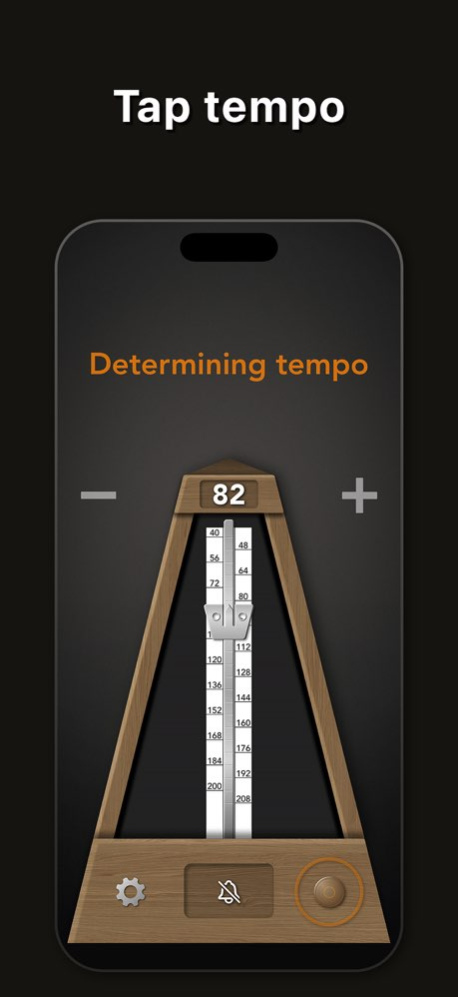
True Metronome - the practice companion musicians have trusted since 2012. No ads. No subscription. Start the metronome in one tap - drag the weight, choose your time signature, and practice. Every beat comes from recordings of real mechanical metronomes, with subtle natural variations that keep long practice sessions pleasant. PRACTICE TOOLS (Pro) - Subdivisions - 11 patterns including triplets, sixteenths and swing - Tempo Trainer - gradually increase the tempo over measures, so you build speed without noticing - Live Tempo Detection - the microphone listens to your playing and shows your actual BPM in real time - Presets - save and load your favorite setups (BPM, time signature, subdivisions) - Flash on Beat - the screen flashes on every beat as a visual cue METRONOME - Zero timing drift - mathematically precise beats - Natural acoustic sound from recordings of real metronomes - Realistic pendulum physics - Time signatures from 1 to 13 beats per measure - Tap tempo to match any song - 5 free detections a day, unlimited with Pro - Beautiful backgrounds and multiple skins APPLE ECOSYSTEM - Apple Watch app - control the metronome from your wrist - Siri - "Hey Siri, start metronome" or "Allegro metronome" - Live Activities & Dynamic Island - tempo always visible - Home Screen & Lock Screen widgets - Background playback TRACK YOUR PROGRESS - Practice stats - daily, weekly, and monthly - Global rankings - compare yourself with musicians in your country and around the world FREE VERSION INCLUDES All tempos (20-400 BPM), all backgrounds, 2 skins, all time signatures, 1 bell accent, and background playback. PRO UPGRADE (one-time purchase) Subdivisions, Tempo Trainer, Live Tempo Detection, Tap Tempo, Presets, Flash on Beat, all skins, all bell accents, Siri, Apple Watch, widgets, and Live Activities. No subscription. Pay once, own it forever. Used by classical musicians, students, and teachers in 190+ countries. Available on iPhone, iPad, Mac, and Apple Watch.
Version History Bug fixes and performance improvements. 5.9.1 Sep 27 Version 5.9.0 improves tempo detection and refreshes the interface. • Tempo detection from sound now uses Apple’s Music Understanding framework on iOS 27, iPadOS 27, and macOS 27. • Tap the Italian tempo marking to choose a musical tempo and set its BPM. • Refined glass controls, panels, animations, and touch feedback. • Clearer onboarding with animated gesture demonstrations. • Faster startup, smoother skin changes, and stability improvements. Thanks for using True Metronome! 5.9.0 Sep 17 Bug fixes and performance improvements. 5.8.2 Aug 1 Bug fixes and performance improvements. 5.8.1 Jul 30 More Rhythms to Practice The subdivision picker now includes seven new patterns alongside quarter, eighth, triplet, and sixteenth: swing, dotted, double-dotted, and quintuplets through octuplets — 5 to 8 notes per beat. Each pattern has its own engraved note glyph, and on Mac the number keys 5–8 select the new tuplets instantly. Tap the note icon above the tempo to try them. 5.8.0 Jul 16 This update includes under-the-hood improvements to keep your practice sessions smooth and reliable. Thank you for using True Metronome! 5.7.2 Jul 9 This update includes under-the-hood improvements to keep your practice sessions smooth and reliable. Thank you for using True Metronome! 5.7.1 Jun 22 Instant Start The first click now sounds the instant you press play, in sync with the pendulum — so you can lock onto a live performance instead of waiting for the first beat. Turn it on in Settings → Playback. 5.7.0 Jun 9 Bug fixes and improvements. 5.6.3 Jun 2 Bug fixes and performance improvements. 5.6.2 May 31 Bug fixes and performance improvements. 5.6.1 May 31 • Tap tempo: first 3 uses free • We'll remind you before your trial ends • Faster, more reliable purchases • Bug fixes 5.6.0 May 25 Bug fixes and performance improvements. 5.5.5 May 19 Bug fixes and performance improvements. 5.5.4 May 13 Bug fixes and performance improvements. 5.5.3 May 6 Bug fixes and performance improvements. 5.5.2 May 2 Bug fixes and improvements 5.5.1 Apr 30 • Extended tempo range: 20–400 BPM • Bug fixes and improvements 5.5 Apr 25 • Extended tempo range: 20–400 BPM • Bug fixes and improvements 5.4 Apr 21 • Tap the BPM number to type in an exact tempo • You can now hide the +/- buttons in Settings • Bug fixes and improvements 5.3 Apr 13 • New: Screen flash on beat — a visual aid that flashes the screen on every beat (Pro) 5.2.2 Apr 9 • New: Screen flash on beat — a visual aid that flashes the screen on every beat (Pro) 5.2.1 Apr 8 • New: Screen flash on beat — a visual aid that flashes the screen on every beat (Pro) 5.2 Apr 7 • New: Presets — save and load your favorite metronome setups (BPM, time signature, subdivisions) 5.1.1 Apr 3 • New: Presets — save and load your favorite metronome setups (BPM, time signature, subdivisions) 5.1 Mar 24
Previous Versions
Here you can find the changelog of True Metronome since it was posted on our website on 2016-09-28 16:01:24.
The latest version is 5.9.1 and it was updated on 2026-10-12 17:43:52. See below the changes in each version.
True Metronome version 5.9.1
Updated At: 2026-10-08
Changes: Version History Bug fixes and performance improvements. 5.9.1 Sep 27 Version 5.9.0 improves tempo detection and refreshes the interface.
• Tempo detection from sound now uses Apple’s Music Understanding framework on iOS 27, iPadOS 27, and macOS 27.
• Tap the Italian tempo marking to choose a musical tempo and set its BPM.
• Refined glass controls, panels, animations, and touch feedback.
• Clearer onboarding with animated gesture demonstrations.
• Faster startup, smoother skin changes, and stability improvements.
Thanks for using True Metronome! 5.9.0 Sep 17 Bug fixes and performance improvements. 5.8.2 Aug 1 Bug fixes and performance improvements. 5.8.1 Jul 30 More Rhythms to Practice
The subdivision picker now includes seven new patterns alongside quarter, eighth, triplet, and sixteenth: swing, dotted, double-dotted, and quintuplets through octuplets — 5 to 8 notes per beat. Each pattern has its own engraved note glyph, and on Mac the number keys 5–8 select the new tuplets instantly. Tap the note icon above the tempo to try them. 5.8.0 Jul 16 This update includes under-the-hood improvements to keep your practice sessions smooth and reliable. Thank you for using True Metronome! 5.7.2 Jul 9 This update includes under-the-hood improvements to keep your practice sessions smooth and reliable. Thank you for using True Metronome! 5.7.1 Jun 22 Instant Start
The first click now sounds the instant you press play, in sync with the pendulum — so you can lock onto a live performance instead of waiting for the first beat. Turn it on in Settings → Playback. 5.7.0 Jun 9 Bug fixes and improvements. 5.6.3 Jun 2 Bug fixes and performance improvements. 5.6.2 May 31 Bug fixes and performance improvements. 5.6.1 May 31 • Tap tempo: first 3 uses free
• We'll remind you before your trial ends
• Faster, more reliable purchases
• Bug fixes 5.6.0 May 25 Bug fixes and performance improvements. 5.5.5 May 19 Bug fixes and performance improvements. 5.5.4 May 13 Bug fixes and performance improvements. 5.5.3 May 6 Bug fixes and performance improvements. 5.5.2 May 2 Bug fixes and improvements 5.5.1 Apr 30 • Extended tempo range: 20–400 BPM
• Bug fixes and improvements 5.5 Apr 25 • Extended tempo range: 20–400 BPM
• Bug fixes and improvements 5.4 Apr 21 • Tap the BPM number to type in an exact tempo
• You can now hide the +/- buttons in Settings
• Bug fixes and improvements 5.3 Apr 13 • New: Screen flash on beat — a visual aid that flashes the screen on every beat (Pro) 5.2.2 Apr 9 • New: Screen flash on beat — a visual aid that flashes the screen on every beat (Pro) 5.2.1 Apr 8 • New: Screen flash on beat — a visual aid that flashes the screen on every beat (Pro) 5.2 Apr 7 • New: Presets — save and load your favorite metronome setups (BPM, time signature, subdivisions) 5.1.1 Apr 3 • New: Presets — save and load your favorite metronome setups (BPM, time signature, subdivisions) 5.1 Mar 24
True Metronome version 5.9.1
Updated At: 2026-10-01
Changes: Version History Bug fixes and performance improvements. 5.9.1 3d ago Version 5.9.0 improves tempo detection and refreshes the interface.
• Tempo detection from sound now uses Apple’s Music Understanding framework on iOS 27, iPadOS 27, and macOS 27.
• Tap the Italian tempo marking to choose a musical tempo and set its BPM.
• Refined glass controls, panels, animations, and touch feedback.
• Clearer onboarding with animated gesture demonstrations.
• Faster startup, smoother skin changes, and stability improvements.
Thanks for using True Metronome! 5.9.0 Sep 17 Bug fixes and performance improvements. 5.8.2 Aug 1 Bug fixes and performance improvements. 5.8.1 Jul 30 More Rhythms to Practice
The subdivision picker now includes seven new patterns alongside quarter, eighth, triplet, and sixteenth: swing, dotted, double-dotted, and quintuplets through octuplets — 5 to 8 notes per beat. Each pattern has its own engraved note glyph, and on Mac the number keys 5–8 select the new tuplets instantly. Tap the note icon above the tempo to try them. 5.8.0 Jul 16 This update includes under-the-hood improvements to keep your practice sessions smooth and reliable. Thank you for using True Metronome! 5.7.2 Jul 9 This update includes under-the-hood improvements to keep your practice sessions smooth and reliable. Thank you for using True Metronome! 5.7.1 Jun 22 Instant Start
The first click now sounds the instant you press play, in sync with the pendulum — so you can lock onto a live performance instead of waiting for the first beat. Turn it on in Settings → Playback. 5.7.0 Jun 9 Bug fixes and improvements. 5.6.3 Jun 2 Bug fixes and performance improvements. 5.6.2 May 31 Bug fixes and performance improvements. 5.6.1 May 31 • Tap tempo: first 3 uses free
• We'll remind you before your trial ends
• Faster, more reliable purchases
• Bug fixes 5.6.0 May 25 Bug fixes and performance improvements. 5.5.5 May 19 Bug fixes and performance improvements. 5.5.4 May 13 Bug fixes and performance improvements. 5.5.3 May 6 Bug fixes and performance improvements. 5.5.2 May 2 Bug fixes and improvements 5.5.1 Apr 30 • Extended tempo range: 20–400 BPM
• Bug fixes and improvements 5.5 Apr 25 • Extended tempo range: 20–400 BPM
• Bug fixes and improvements 5.4 Apr 21 • Tap the BPM number to type in an exact tempo
• You can now hide the +/- buttons in Settings
• Bug fixes and improvements 5.3 Apr 13 • New: Screen flash on beat — a visual aid that flashes the screen on every beat (Pro) 5.2.2 Apr 9 • New: Screen flash on beat — a visual aid that flashes the screen on every beat (Pro) 5.2.1 Apr 8 • New: Screen flash on beat — a visual aid that flashes the screen on every beat (Pro) 5.2 Apr 7 • New: Presets — save and load your favorite metronome setups (BPM, time signature, subdivisions) 5.1.1 Apr 3 • New: Presets — save and load your favorite metronome setups (BPM, time signature, subdivisions) 5.1 Mar 24
True Metronome version 5.9.0
Updated At: 2026-09-24
Changes: Version History Version 5.9.0 improves tempo detection and refreshes the interface.
• Tempo detection from sound now uses Apple’s Music Understanding framework on iOS 27, iPadOS 27, and macOS 27.
• Tap the Italian tempo marking to choose a musical tempo and set its BPM.
• Refined glass controls, panels, animations, and touch feedback.
• Clearer onboarding with animated gesture demonstrations.
• Faster startup, smoother skin changes, and stability improvements.
Thanks for using True Metronome! 5.9.0 6d ago Bug fixes and performance improvements. 5.8.2 Aug 1 Bug fixes and performance improvements. 5.8.1 Jul 30 More Rhythms to Practice
The subdivision picker now includes seven new patterns alongside quarter, eighth, triplet, and sixteenth: swing, dotted, double-dotted, and quintuplets through octuplets — 5 to 8 notes per beat. Each pattern has its own engraved note glyph, and on Mac the number keys 5–8 select the new tuplets instantly. Tap the note icon above the tempo to try them. 5.8.0 Jul 16 This update includes under-the-hood improvements to keep your practice sessions smooth and reliable. Thank you for using True Metronome! 5.7.2 Jul 9 This update includes under-the-hood improvements to keep your practice sessions smooth and reliable. Thank you for using True Metronome! 5.7.1 Jun 22 Instant Start
The first click now sounds the instant you press play, in sync with the pendulum — so you can lock onto a live performance instead of waiting for the first beat. Turn it on in Settings → Playback. 5.7.0 Jun 9 Bug fixes and improvements. 5.6.3 Jun 2 Bug fixes and performance improvements. 5.6.2 May 31 Bug fixes and performance improvements. 5.6.1 May 31 • Tap tempo: first 3 uses free
• We'll remind you before your trial ends
• Faster, more reliable purchases
• Bug fixes 5.6.0 May 25 Bug fixes and performance improvements. 5.5.5 May 19 Bug fixes and performance improvements. 5.5.4 May 13 Bug fixes and performance improvements. 5.5.3 May 6 Bug fixes and performance improvements. 5.5.2 May 2 Bug fixes and improvements 5.5.1 Apr 30 • Extended tempo range: 20–400 BPM
• Bug fixes and improvements 5.5 Apr 25 • Extended tempo range: 20–400 BPM
• Bug fixes and improvements 5.4 Apr 21 • Tap the BPM number to type in an exact tempo
• You can now hide the +/- buttons in Settings
• Bug fixes and improvements 5.3 Apr 13 • New: Screen flash on beat — a visual aid that flashes the screen on every beat (Pro) 5.2.2 Apr 9 • New: Screen flash on beat — a visual aid that flashes the screen on every beat (Pro) 5.2.1 Apr 8 • New: Screen flash on beat — a visual aid that flashes the screen on every beat (Pro) 5.2 Apr 7 • New: Presets — save and load your favorite metronome setups (BPM, time signature, subdivisions) 5.1.1 Apr 3 • New: Presets — save and load your favorite metronome setups (BPM, time signature, subdivisions) 5.1 Mar 24 True Metronome 5 — completely rebuilt from the ground up.
Now free with no ads!
New in v5:
- Subdivisions — eighth notes, triplets, sixteenth notes
- Tempo Trainer — gradual tempo increase for building speed
- Live Tempo Detection — microphone listens and shows your BPM
- 4 beautiful backgrounds
- Refined UI with smoother animations
- Rewritten in Swift for better performance
Pro upgrade (one-time purchase) for all advanced features.
No subscription, ever. 5.0 Mar 20
True Metronome version 5.8.2
Updated At: 2026-09-17
Changes: Version History Bug fixes and performance improvements. 5.8.2 Aug 1 Bug fixes and performance improvements. 5.8.1 Jul 30 More Rhythms to Practice
The subdivision picker now includes seven new patterns alongside quarter, eighth, triplet, and sixteenth: swing, dotted, double-dotted, and quintuplets through octuplets — 5 to 8 notes per beat. Each pattern has its own engraved note glyph, and on Mac the number keys 5–8 select the new tuplets instantly. Tap the note icon above the tempo to try them. 5.8.0 Jul 16 This update includes under-the-hood improvements to keep your practice sessions smooth and reliable. Thank you for using True Metronome! 5.7.2 Jul 9 This update includes under-the-hood improvements to keep your practice sessions smooth and reliable. Thank you for using True Metronome! 5.7.1 Jun 22 Instant Start
The first click now sounds the instant you press play, in sync with the pendulum — so you can lock onto a live performance instead of waiting for the first beat. Turn it on in Settings → Playback. 5.7.0 Jun 9 Bug fixes and improvements. 5.6.3 Jun 2 Bug fixes and performance improvements. 5.6.2 May 31 Bug fixes and performance improvements. 5.6.1 May 31 • Tap tempo: first 3 uses free
• We'll remind you before your trial ends
• Faster, more reliable purchases
• Bug fixes 5.6.0 May 25 Bug fixes and performance improvements. 5.5.5 May 19 Bug fixes and performance improvements. 5.5.4 May 13 Bug fixes and performance improvements. 5.5.3 May 6 Bug fixes and performance improvements. 5.5.2 May 2 Bug fixes and improvements 5.5.1 Apr 30 • Extended tempo range: 20–400 BPM
• Bug fixes and improvements 5.5 Apr 25 • Extended tempo range: 20–400 BPM
• Bug fixes and improvements 5.4 Apr 21 • Tap the BPM number to type in an exact tempo
• You can now hide the +/- buttons in Settings
• Bug fixes and improvements 5.3 Apr 13 • New: Screen flash on beat — a visual aid that flashes the screen on every beat (Pro) 5.2.2 Apr 9 • New: Screen flash on beat — a visual aid that flashes the screen on every beat (Pro) 5.2.1 Apr 8 • New: Screen flash on beat — a visual aid that flashes the screen on every beat (Pro) 5.2 Apr 7 • New: Presets — save and load your favorite metronome setups (BPM, time signature, subdivisions) 5.1.1 Apr 3 • New: Presets — save and load your favorite metronome setups (BPM, time signature, subdivisions) 5.1 Mar 24 True Metronome 5 — completely rebuilt from the ground up.
Now free with no ads!
New in v5:
- Subdivisions — eighth notes, triplets, sixteenth notes
- Tempo Trainer — gradual tempo increase for building speed
- Live Tempo Detection — microphone listens and shows your BPM
- 4 beautiful backgrounds
- Refined UI with smoother animations
- Rewritten in Swift for better performance
Pro upgrade (one-time purchase) for all advanced features.
No subscription, ever. 5.0 Mar 20 • World rankings — compare your practice time with musicians in your country and worldwide
• Improved power efficiency in background mode
• Fixed an issue with practice time calculation 4.6 Jan 1
True Metronome version 5.8.0
Updated At: 2026-07-23
Changes: Version History More Rhythms to Practice
The subdivision picker now includes seven new patterns alongside quarter, eighth, triplet, and sixteenth: swing, dotted, double-dotted, and quintuplets through octuplets — 5 to 8 notes per beat. Each pattern has its own engraved note glyph, and on Mac the number keys 5–8 select the new tuplets instantly. Tap the note icon above the tempo to try them. 5.8.0 Jul 16 This update includes under-the-hood improvements to keep your practice sessions smooth and reliable. Thank you for using True Metronome! 5.7.2 Jul 9 This update includes under-the-hood improvements to keep your practice sessions smooth and reliable. Thank you for using True Metronome! 5.7.1 Jun 22 Instant Start
The first click now sounds the instant you press play, in sync with the pendulum — so you can lock onto a live performance instead of waiting for the first beat. Turn it on in Settings → Playback. 5.7.0 Jun 9 Bug fixes and improvements. 5.6.3 Jun 2 Bug fixes and performance improvements. 5.6.2 May 31 Bug fixes and performance improvements. 5.6.1 May 31 • Tap tempo: first 3 uses free
• We'll remind you before your trial ends
• Faster, more reliable purchases
• Bug fixes 5.6.0 May 25 Bug fixes and performance improvements. 5.5.5 May 19 Bug fixes and performance improvements. 5.5.4 May 13 Bug fixes and performance improvements. 5.5.3 May 6 Bug fixes and performance improvements. 5.5.2 May 2 Bug fixes and improvements 5.5.1 Apr 30 • Extended tempo range: 20–400 BPM
• Bug fixes and improvements 5.5 Apr 25 • Extended tempo range: 20–400 BPM
• Bug fixes and improvements 5.4 Apr 21 • Tap the BPM number to type in an exact tempo
• You can now hide the +/- buttons in Settings
• Bug fixes and improvements 5.3 Apr 13 • New: Screen flash on beat — a visual aid that flashes the screen on every beat (Pro) 5.2.2 Apr 9 • New: Screen flash on beat — a visual aid that flashes the screen on every beat (Pro) 5.2.1 Apr 8 • New: Screen flash on beat — a visual aid that flashes the screen on every beat (Pro) 5.2 Apr 7 • New: Presets — save and load your favorite metronome setups (BPM, time signature, subdivisions) 5.1.1 Apr 3 • New: Presets — save and load your favorite metronome setups (BPM, time signature, subdivisions) 5.1 Mar 24 True Metronome 5 — completely rebuilt from the ground up.
Now free with no ads!
New in v5:
- Subdivisions — eighth notes, triplets, sixteenth notes
- Tempo Trainer — gradual tempo increase for building speed
- Live Tempo Detection — microphone listens and shows your BPM
- 4 beautiful backgrounds
- Refined UI with smoother animations
- Rewritten in Swift for better performance
Pro upgrade (one-time purchase) for all advanced features.
No subscription, ever. 5.0 Mar 20 • World rankings — compare your practice time with musicians in your country and worldwide
• Improved power efficiency in background mode
• Fixed an issue with practice time calculation 4.6 Jan 1 Bottom text now shows current beat number during the playback.
Volume control is now more natural and consistent across the full range. 4.5 12/30/2025 Added Home Screen widgets
Added more Lock Screen widgets
Improved tooltips
Fixed a few bugs 4.4 12/22/2025
True Metronome version 5.7.1
Updated At: 2026-07-05
Changes: Version History This update includes under-the-hood improvements to keep your practice sessions smooth and reliable. Thank you for using True Metronome! 5.7.1 Jun 22 Instant Start
The first click now sounds the instant you press play, in sync with the pendulum — so you can lock onto a live performance instead of waiting for the first beat. Turn it on in Settings → Playback. 5.7.0 Jun 9 Bug fixes and improvements. 5.6.3 Jun 2 Bug fixes and performance improvements. 5.6.2 May 31 Bug fixes and performance improvements. 5.6.1 May 31 • Tap tempo: first 3 uses free
• We'll remind you before your trial ends
• Faster, more reliable purchases
• Bug fixes 5.6.0 May 25 Bug fixes and performance improvements. 5.5.5 May 19 Bug fixes and performance improvements. 5.5.4 May 13 Bug fixes and performance improvements. 5.5.3 May 6 Bug fixes and performance improvements. 5.5.2 May 2 Bug fixes and improvements 5.5.1 Apr 30 • Extended tempo range: 20–400 BPM
• Bug fixes and improvements 5.5 Apr 25 • Extended tempo range: 20–400 BPM
• Bug fixes and improvements 5.4 Apr 21 • Tap the BPM number to type in an exact tempo
• You can now hide the +/- buttons in Settings
• Bug fixes and improvements 5.3 Apr 13 • New: Screen flash on beat — a visual aid that flashes the screen on every beat (Pro) 5.2.2 Apr 9 • New: Screen flash on beat — a visual aid that flashes the screen on every beat (Pro) 5.2.1 Apr 8 • New: Screen flash on beat — a visual aid that flashes the screen on every beat (Pro) 5.2 Apr 7 • New: Presets — save and load your favorite metronome setups (BPM, time signature, subdivisions) 5.1.1 Apr 3 • New: Presets — save and load your favorite metronome setups (BPM, time signature, subdivisions) 5.1 Mar 24 True Metronome 5 — completely rebuilt from the ground up.
Now free with no ads!
New in v5:
- Subdivisions — eighth notes, triplets, sixteenth notes
- Tempo Trainer — gradual tempo increase for building speed
- Live Tempo Detection — microphone listens and shows your BPM
- 4 beautiful backgrounds
- Refined UI with smoother animations
- Rewritten in Swift for better performance
Pro upgrade (one-time purchase) for all advanced features.
No subscription, ever. 5.0 Mar 20 • World rankings — compare your practice time with musicians in your country and worldwide
• Improved power efficiency in background mode
• Fixed an issue with practice time calculation 4.6 Jan 1 Bottom text now shows current beat number during the playback.
Volume control is now more natural and consistent across the full range. 4.5 12/30/2025 Added Home Screen widgets
Added more Lock Screen widgets
Improved tooltips
Fixed a few bugs 4.4 12/22/2025 Added Siri commands. Now you can control True Metronome with phrases like "Start Metronome", "Stop Metronome", "Andante Metronome".
Added widgets on lock screen.
Fixed a few minor bugs. 4.3 12/21/2025 Added Apple Watch support
Added Live Activities
Fixed a few bugs 4.2 12/14/2025
True Metronome version 5.7.1
Updated At: 2026-06-28
Changes: Version History This update includes under-the-hood improvements to keep your practice sessions smooth and reliable. Thank you for using True Metronome! 5.7.1 5d ago Instant Start
The first click now sounds the instant you press play, in sync with the pendulum — so you can lock onto a live performance instead of waiting for the first beat. Turn it on in Settings → Playback. 5.7.0 Jun 9 Bug fixes and improvements. 5.6.3 Jun 2 Bug fixes and performance improvements. 5.6.2 May 31 Bug fixes and performance improvements. 5.6.1 May 31 • Tap tempo: first 3 uses free
• We'll remind you before your trial ends
• Faster, more reliable purchases
• Bug fixes 5.6.0 May 25 Bug fixes and performance improvements. 5.5.5 May 19 Bug fixes and performance improvements. 5.5.4 May 13 Bug fixes and performance improvements. 5.5.3 May 6 Bug fixes and performance improvements. 5.5.2 May 2 Bug fixes and improvements 5.5.1 Apr 30 • Extended tempo range: 20–400 BPM
• Bug fixes and improvements 5.5 Apr 25 • Extended tempo range: 20–400 BPM
• Bug fixes and improvements 5.4 Apr 21 • Tap the BPM number to type in an exact tempo
• You can now hide the +/- buttons in Settings
• Bug fixes and improvements 5.3 Apr 13 • New: Screen flash on beat — a visual aid that flashes the screen on every beat (Pro) 5.2.2 Apr 9 • New: Screen flash on beat — a visual aid that flashes the screen on every beat (Pro) 5.2.1 Apr 8 • New: Screen flash on beat — a visual aid that flashes the screen on every beat (Pro) 5.2 Apr 7 • New: Presets — save and load your favorite metronome setups (BPM, time signature, subdivisions) 5.1.1 Apr 3 • New: Presets — save and load your favorite metronome setups (BPM, time signature, subdivisions) 5.1 Mar 24 True Metronome 5 — completely rebuilt from the ground up.
Now free with no ads!
New in v5:
- Subdivisions — eighth notes, triplets, sixteenth notes
- Tempo Trainer — gradual tempo increase for building speed
- Live Tempo Detection — microphone listens and shows your BPM
- 4 beautiful backgrounds
- Refined UI with smoother animations
- Rewritten in Swift for better performance
Pro upgrade (one-time purchase) for all advanced features.
No subscription, ever. 5.0 Mar 20 • World rankings — compare your practice time with musicians in your country and worldwide
• Improved power efficiency in background mode
• Fixed an issue with practice time calculation 4.6 Jan 1 Bottom text now shows current beat number during the playback.
Volume control is now more natural and consistent across the full range. 4.5 12/30/2025 Added Home Screen widgets
Added more Lock Screen widgets
Improved tooltips
Fixed a few bugs 4.4 12/22/2025 Added Siri commands. Now you can control True Metronome with phrases like "Start Metronome", "Stop Metronome", "Andante Metronome".
Added widgets on lock screen.
Fixed a few minor bugs. 4.3 12/21/2025 Added Apple Watch support
Added Live Activities
Fixed a few bugs 4.2 12/14/2025
True Metronome version 5.6.0
Updated At: 2026-05-27
Changes: Version History • Tap tempo: first 3 uses free
• We'll remind you before your trial ends
• Faster, more reliable purchases
• Bug fixes 5.6.0 1d ago Bug fixes and performance improvements. 5.5.5 May 19 Bug fixes and performance improvements. 5.5.4 May 13 Bug fixes and performance improvements. 5.5.3 May 6 Bug fixes and performance improvements. 5.5.2 May 2 Bug fixes and improvements 5.5.1 Apr 30 • Extended tempo range: 20–400 BPM
• Bug fixes and improvements 5.5 Apr 25 • Extended tempo range: 20–400 BPM
• Bug fixes and improvements 5.4 Apr 21 • Tap the BPM number to type in an exact tempo
• You can now hide the +/- buttons in Settings
• Bug fixes and improvements 5.3 Apr 13 • New: Screen flash on beat — a visual aid that flashes the screen on every beat (Pro) 5.2.2 Apr 9 • New: Screen flash on beat — a visual aid that flashes the screen on every beat (Pro) 5.2.1 Apr 8 • New: Screen flash on beat — a visual aid that flashes the screen on every beat (Pro) 5.2 Apr 7 • New: Presets — save and load your favorite metronome setups (BPM, time signature, subdivisions) 5.1.1 Apr 3 • New: Presets — save and load your favorite metronome setups (BPM, time signature, subdivisions) 5.1 Mar 24 True Metronome 5 — completely rebuilt from the ground up.
Now free with no ads!
New in v5:
- Subdivisions — eighth notes, triplets, sixteenth notes
- Tempo Trainer — gradual tempo increase for building speed
- Live Tempo Detection — microphone listens and shows your BPM
- 4 beautiful backgrounds
- Refined UI with smoother animations
- Rewritten in Swift for better performance
Pro upgrade (one-time purchase) for all advanced features.
No subscription, ever. 5.0 Mar 20 • World rankings — compare your practice time with musicians in your country and worldwide
• Improved power efficiency in background mode
• Fixed an issue with practice time calculation 4.6 Jan 1 Bottom text now shows current beat number during the playback.
Volume control is now more natural and consistent across the full range. 4.5 12/30/2025 Added Home Screen widgets
Added more Lock Screen widgets
Improved tooltips
Fixed a few bugs 4.4 12/22/2025 Added Siri commands. Now you can control True Metronome with phrases like "Start Metronome", "Stop Metronome", "Andante Metronome".
Added widgets on lock screen.
Fixed a few minor bugs. 4.3 12/21/2025 Added Apple Watch support
Added Live Activities
Fixed a few bugs 4.2 12/14/2025 Now you can swipe skins on the main screen
Added new skin
Added landscape orientation and multitasking support for iPad
iOS 26 style with liquid glass effect in setting
Bug fixes 4.1 12/09/2025 New background with moving curtains
Updated icon
Button sounds
Improved bell sound 1
Statistics screen
Bug fixes 4.0 12/03/2025 New icon
Better tutorial
Improved color scheme in settings 3.15 12/03/2025 The pendulum now moves with true-to-life physics!
Also added multiple bell sounds so you can choose your favorite. 3.14 11/20/2025 Replaced the bell sound
Fixed bugs 3.13 11/15/2025
True Metronome version 4.6
Updated At: 2026-01-01
Changes: • World rankings — compare your practice time with musicians in your country and worldwide
• Improved power efficiency in background mode
• Fixed an issue with practice time calculation
True Metronome version 3.11
Updated At: 2024-09-12
Changes: Sep 12, 2024
Version 3.11
Added help tips for first-time users
Added value "1" for the bell
Disclaimer
Official App Store Link
We do not host True Metronome on our servers. We did not scan it for viruses, adware, spyware or other type of malware. This app is hosted by Apple and passed their terms and conditions to be listed there. We recommend caution when installing it.
The App Store link for True Metronome is provided to you by apps112.com without any warranties, representations or guarantees of any kind, so access it at your own risk.
If you have questions regarding this particular app contact the publisher directly. For questions about the functionalities of apps112.com contact us.